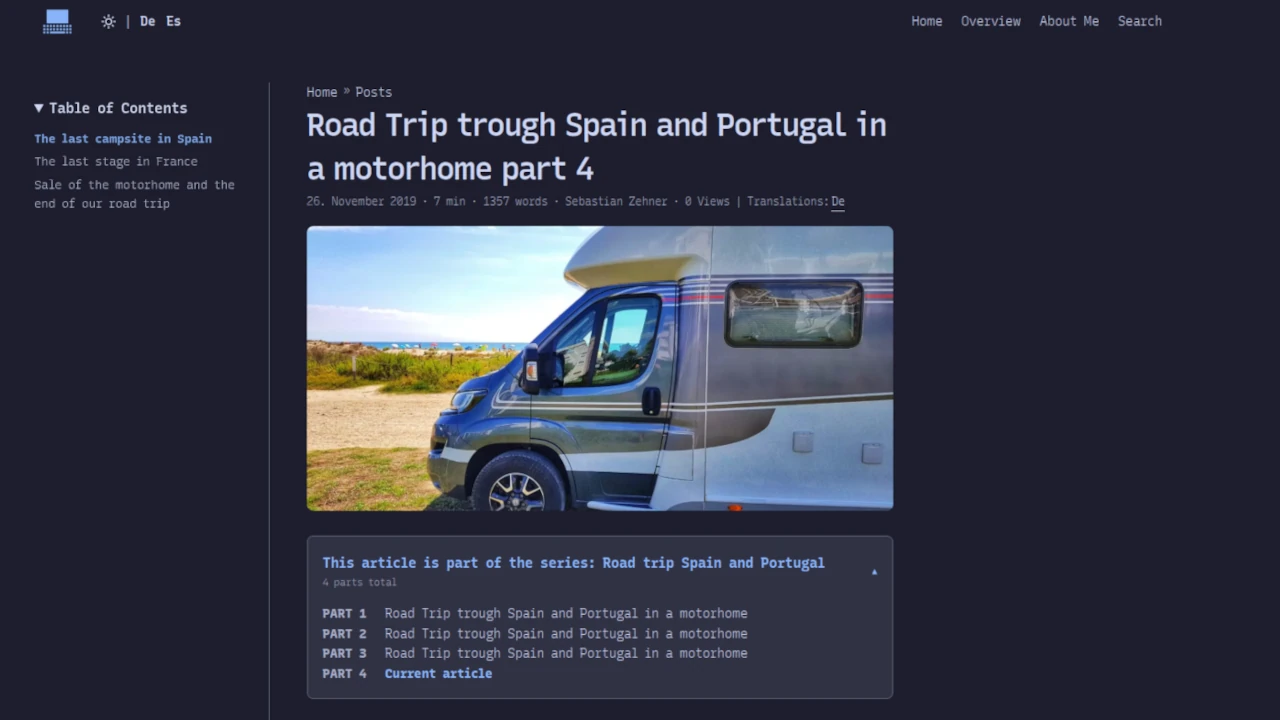
Who doesn’t know this? Sometimes, a single blog post simply isn’t enough to cover a topic in depth. You might decide to write a series of articles, but how are readers supposed to keep track of them? Although Hugo comes with categories and tags by default, it doesn’t offer a built-in way to display the series visually, showing their progression or order.
Recently, I solved this problem for my blog and implemented a series functionality. In this guide, I’ll show you how you can easily do the same using Hugo’s built-in tools.
Why a “series” function?
When a reader comes across a part of a series, they usually want to know three things:
- That this post is part of a larger series.
- Which part is he currently reading (for example, Part 2 out of 5)?
- Where are the links to the other parts of the series?
Step 1: Register the series with Hugo
First, we need to inform Hugo that in addition to tags and categories, there are now also “series”. Please modify your hugo.yaml as follows:
taxonomies:
  categories: categories
  tags: tags
  series: series
Step 2: Create the partial
We will create a “partial” – that is, a reusable code snippet. First, generate the file layouts/partials/series.html and insert the following code into it:
{{ $series := .GetTerms "series" }}
{{ if $series }}
    {{ range $series }}
    {{ $posts := .Pages.ByDate }}
    {{ $count := len $posts }}
    <aside class="series-container">
        <details {{ if lt $count 5 }}open{{ end }}>
            <summary class="series-summary">
                <div class="series-header-text">
                    <span class="series-title">
                        {{ i18n "series_title" }}: {{ .Name }}
                    </span>
                    <span class="series-count">
                        {{ i18n "series_parts_total" $count }}
                    </span>
                </div>
            </summary>
            <ul class="series-list">
                {{ range $num, $post := $posts }}
                    {{ $isCurrent := eq $post.Permalink $.Page.Permalink }}
                    <li class="series-item">
                        <span class="series-part-label">
                            {{ i18n "series_part" }} {{ add $num 1 }}
                        </span>
                        {{ if $isCurrent }}
                            <span class="series-item-current" aria-current="page">
                                 {{ i18n "series_current" }}
                            </span>
                        {{ else }}
                            <a href="{{ $post.Permalink }}" class="series-item-link">
                                {{ .Params.series_title | default .Title }}
                            </a>
                        {{ end }}
                    </li>
                {{ end }}
            </ul>
        </details>
    </aside>
    {{ end }}
{{ end }}
The code in detail:
-
We start with
.GetTerms "series": This command accesses the taxonomy. If an article is assigned to multiple series, the code will generate a separate box for each series thanks to the subsequentrangeloop. -
The sorting (
.Pages.ByDate): By default, Hugo often displays pages in order based on their weight or date, in descending order. With.ByDate, we ensure that the series is listed logically from beginning to end (Part 1, Part 2, Part 3, etc.). -
Dynamic status of the box: This is a nice convenience feature. If the series is short (less than 5 episodes), the box remains open. For very long series, the box folds shut to prevent interrupting the reading experience.
<details {{ if lt $count 5 }}open{{ end }}>
- Automated numbering: We don’t need to manually enter the part number in the front matter. Hugo uses the index of the loop (which starts at 0) and simply calculates
+ 1.
{{ range $num, $post := $posts }} ... {{ add $num 1 }}
-
Language with
i18n: To ensure that texts (such as “Part 1”) work in different languages, we use Hugo’s internationalization functionality. -
Flexible title handling: Here, we use a pipe (
|) to determine how the title should be generated. If an article contains a specialseries_title(for example, a shorter title used for the list), that title will be used. If not, Hugo will automatically resort to the regular.Title.
{{ .Params.series_title | default .Title }}
- Logic for the current post: The code checks whether the link is in the list of the current post (
$isCurrent). If it is, the link is highlighted and becomes non-clickable.
Step 3: Integration into the template
In order for the box to also be displayed, you need to insert that code snippet into your single-post template (usually it’s somewhere around layouts/_default/single.html). I placed it right before the content.
{{ partial "series.html" . }}
<div class="post-content">
  {{ .Content }}
</div>
Step 4: Language files and styling
To ensure that the terms are translated correctly, add the following content to your i18n files in the respective languages:
- id: series_part
  translation: "Teil"
- id: series_title
  translation: "Dieser Artikel ist Teil der Serie"
- id: series_current
  translation: "Aktueller Beitrag"
- id: series_parts_total
  translation:
    one: "Teil insgesamt"
    other: "{{ .Count }} Teile insgesamt"
Don’t forget to add some styling to your post-single.css as well, so that the box looks compatible with your blog’s design (for example, by adjusting margins, using a frame, or setting the background color).
Application in the blog post (frontmatter)
To assign a post to a series, you just need to add the frontmatter information to your article.
series:
  - Roadtrip Spanien und Portugal
# Optional shorter title for the list
series_title: Camping mit dem Wohnmobil durch Spanien und Portugal
Looking ahead: What’s next?
I directly used that function to reorganize my four older posts about the road trip through Spain and Portugal:. Please take a look at it!
The actual reason for this renovation is another project that is about to start: a new, in-depth series on the topic of “freedom in email communication”.
The discussion will focus on whether and how one can break away from large providers, as well as what alternatives exist to hosting everything locally in one’s own home lab. The topic will be approached not only from a technical perspective but also with a bit of philosophical insight. Have we already lost our freedom when it comes to using email services provided by these companies?
Thanks to the new series feature, I hope you’ll always be able to keep track of everything! You can find all my series from now on under Series; this link is also available on Overview Page.
What do you think? Do you also use series to create content for your blogs, or do you find the traditional “tag cloud” of posts sufficient? Feel free to let me know in the comments!
I look forward to your feedback!